NEW RELEASE V1.0.6

The CS2 radar that sees everything

A live top-down map of your match: enemy positions, health, weapons and economy, in your browser and on your phone.

HWID Locked 0% Lag Web Based
CS Radar UI
Enemy Spotted Upper Tunnels
Enemy Spotted Mid Doors
What is CS Radar?

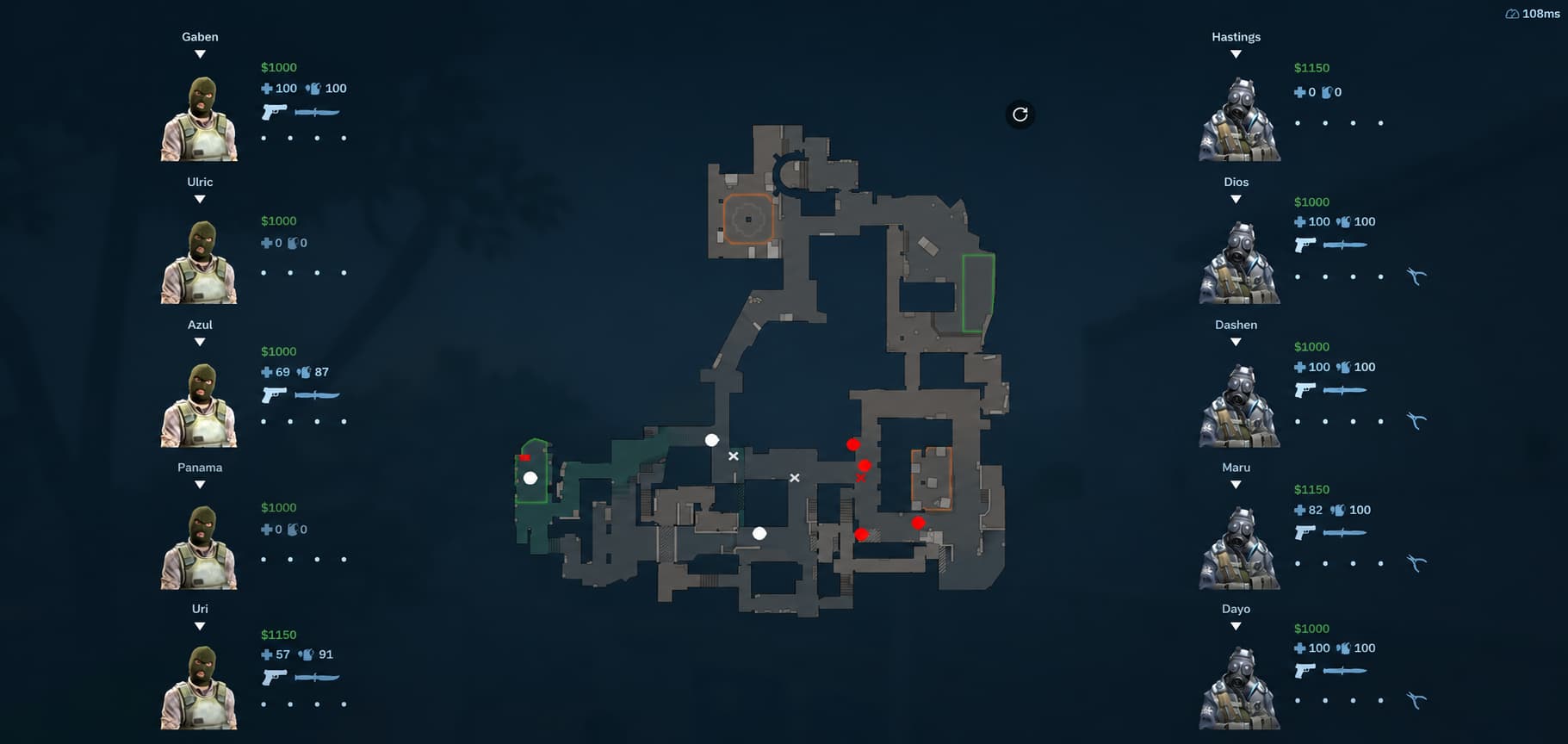
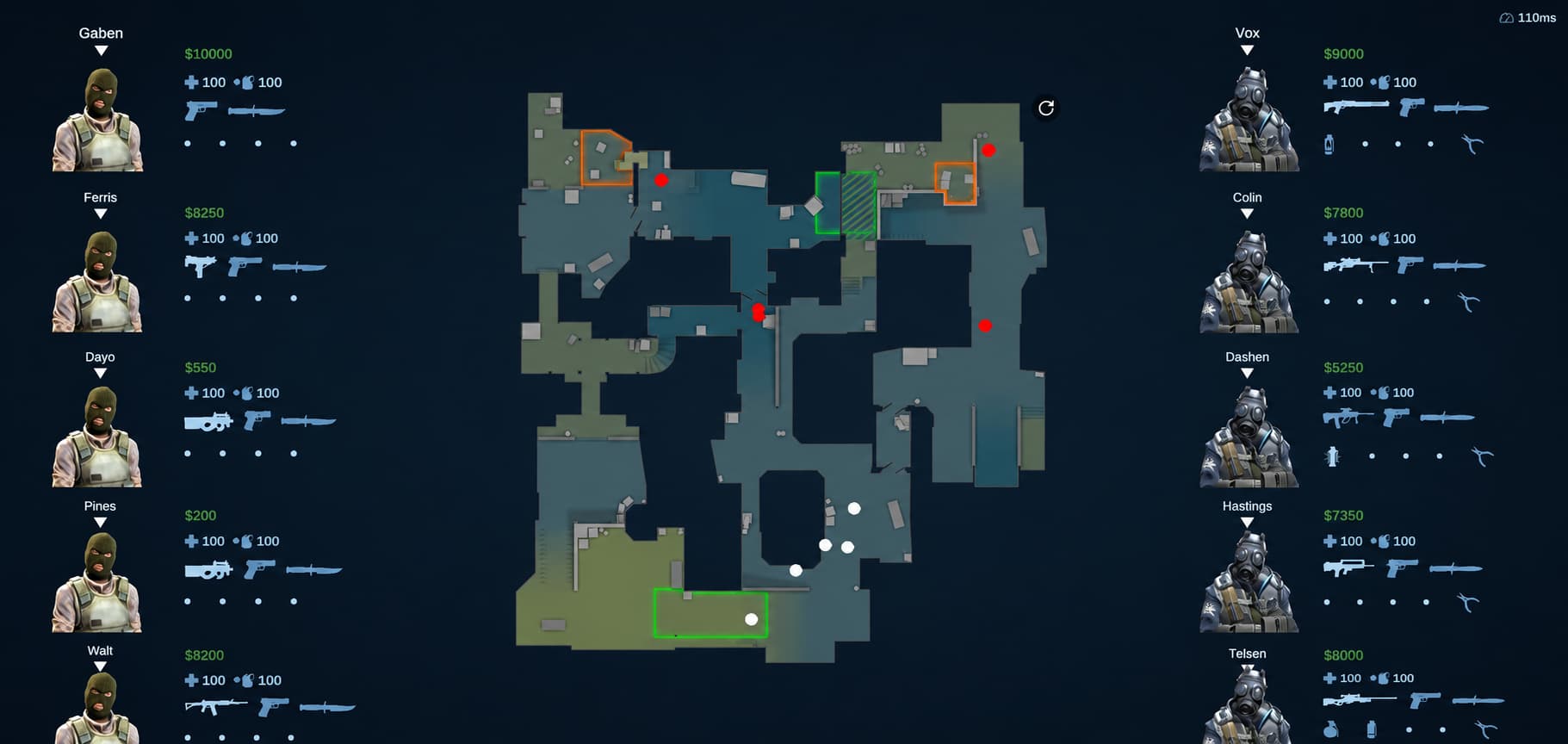
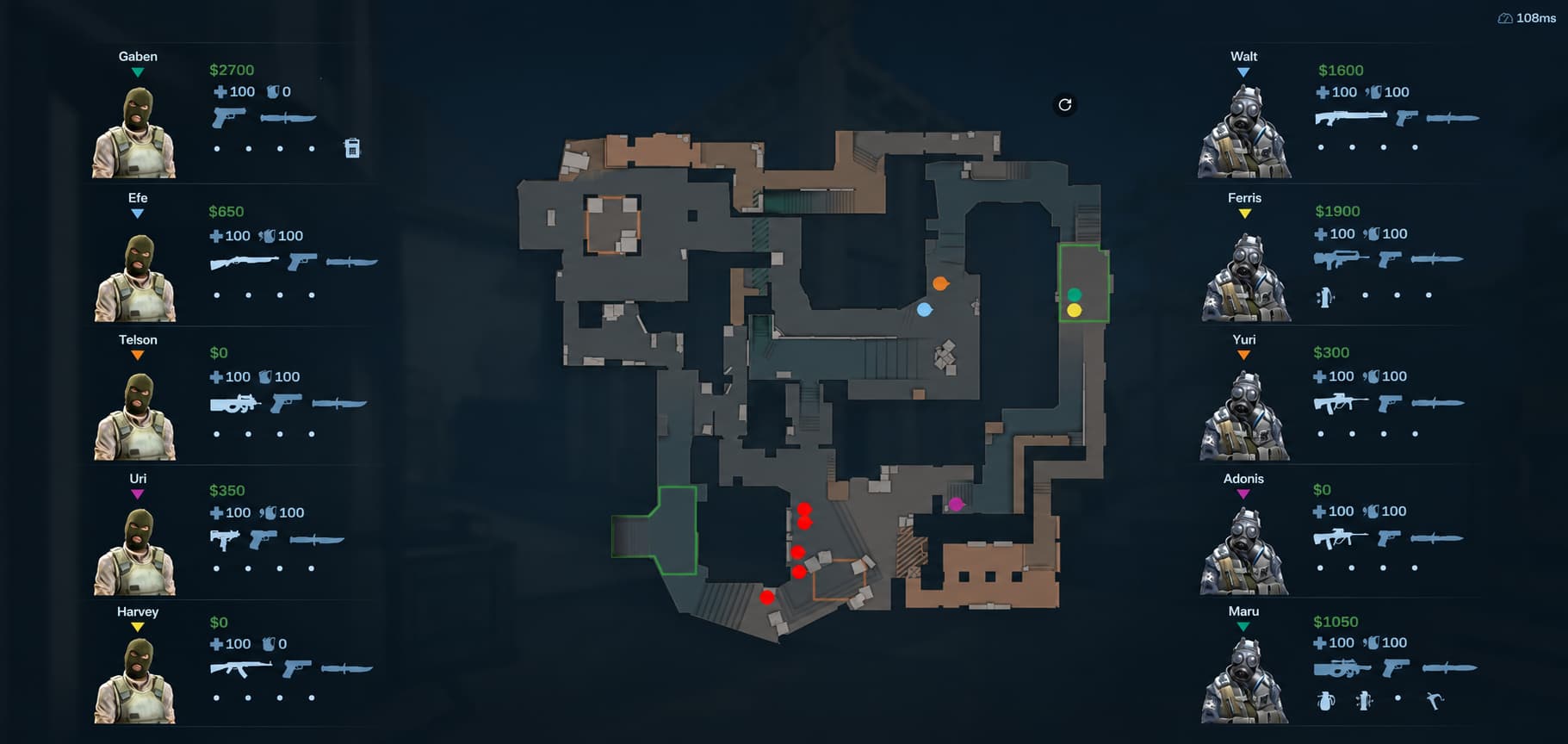
CS Radar is a CS2 web radar: a live, top-down map of your Counter-Strike 2 match that runs in a web browser instead of inside the game. It shows enemy positions, health, weapons, and economy in real time, giving you the kind of overview a coach or spectator normally sees.

That extra information is your edge. Use CS Radar to read enemy rotations before they show, time utility like smokes and flashes, watch the bomb timer to the second, and predict their next buy from the enemy economy, so you take better fights and stop walking into setups blind. Because it runs in a browser as a separate app, it stays out of your game view with zero impact on performance.

CS Radar delivers this as a lightweight external application. It runs alongside CS2, serves the radar to your browser from a local web server, and refreshes its data automatically after each game update, so your radar keeps working without manual patches or configuration. Because the radar is served over your local network, you can open it on any device on your Wi-Fi, not just the PC running the game.

Every detail is considered

Advanced telemetry, zero impact on the game.

Light & Fast

Minimal performance impact on your PC. The radar logic runs in a headless C++ binary.

Runs Outside CS2

Fully external architecture with zero memory writing ensures safe and secure operation.

Multiple Maps

Automatic map loading. Supports all active duty CS2 maps directly out of the box.

Real-Time Updates

Live WebSocket streaming pushes enemy positions to your radar the instant they change, with no noticeable delay.

Strict HWID Lock

Your license is mathematically bound to your hardware for maximum security.

Watch on Any Device

CS Radar serves the radar across your local network, so you can watch it on a second monitor, your phone, a tablet, or another PC on the same Wi-Fi.

Take control of the match with an unparalleled view of the map.

High definition radar imagery with instant websocket updates.

Dust II Mirage Inferno
CS Radar live radar view of Dust II showing enemy positions, health and weapons CS Radar live radar view of Mirage showing enemy positions, health and weapons CS Radar live radar view of Inferno showing enemy positions, health and weapons

Enemy details

View precise health bars, equipped weapons, and defuse kits in real-time.

Economy tracker

See exactly how much money the enemy team has and predict their buys.

Live positions

See every enemy's exact location and movement on a top-down map, updated in real time.

Bomb timer Coming soon

Exact C4 explosion timing directly on your screen so you never guess.

How to use it

You are just 3 simple steps away from dominating your next competitive match.

1

Download the tool

Purchase a license and download our single executable. No complex installation required.

2

Run in background

Open the application before launching CS2. It will quietly run in the background reading data.

3

Open the web app

The tool automatically extracts and runs a local web server and opens the radar in your browser. You can also open that radar on any other device on your network, like your phone or a second monitor.

Instructions

Simple pricing

No hidden fees. One-time payment.

1 Month
$4.99
Get access
3 Months
$13.99
Get access
6 Months
$24.99
Get access

Every plan includes all features. Powered securely by Lemon Squeezy.

Frequently asked questions

Can you get banned for using a CS2 radar?

CS Radar runs entirely outside Counter-Strike 2 as a separate headless C++ program. It does not inject code into the game and does not write to game memory, which is what signature scanning looks for. No customer has reported a VAC ban from using CS Radar. That is an architectural difference and a support record rather than a guarantee, and Valve classifies any third-party tool that gives a player an advantage as a cheat. Read the VAC and anti-cheat page on this site before you buy.

Does CS Radar work on FACEIT?

CS Radar does not work with FACEIT Anti-Cheat. FACEIT Anti-Cheat blocks external programs from reading the game, so the radar has nothing to display while it is loaded, and no setting on our side changes that. CS Radar is built for official Valve matchmaking: Premier, competitive, casual and community servers. We say this before you buy rather than after, because if FACEIT is where you play, CS Radar is not the tool for you.

How does the HWID license work?

Your CS Radar license key is cryptographically bound to your specific hardware (HWID) upon first activation. You cannot share your license with others. If you upgrade your PC, you will need to purchase a new license.

Will it affect my game FPS?

CS Radar operates completely independently of the CS2 rendering pipeline, so it has a 0% impact on your in-game framerate.

What happens if the game updates?

CS Radar uses advanced dynamic pattern scanning. When CS2 updates, the radar automatically fetches the newest memory offsets instantly, so you never have to wait for manual updates.

How much does CS Radar cost?

CS Radar is a one-time payment with no subscription: $4.99 for 1 month, $13.99 for 3 months, $24.99 for 6 months, or $49.99 for 1 year. Every plan includes all features and is billed securely through Lemon Squeezy.

Which CS2 maps does CS Radar support?

CS Radar supports all active duty CS2 maps out of the box, including Dust II, Mirage, and Inferno. Maps load automatically, so there is nothing to set up when you change maps in a match.

What do I need to run CS Radar?

You need a Windows PC and an active CS Radar license. After purchasing, you download a single executable, run it before launching CS2, and open the radar in your browser. It does not work with FACEIT Anti-Cheat, so it is for official Valve matchmaking rather than FACEIT.

How do I activate my CS Radar license?

When you first launch CS Radar, it asks for your license key. The key binds automatically to the hardware ID (HWID) of your PC, so you only enter it once per machine and it cannot be shared with other computers.

Can I open the radar on my phone or another device?

CS Radar can be opened on any device on your network. When you start CS Radar and open the radar in your browser, a network address is shown just below the map. Enter that address in a browser on any other device connected to the same Wi-Fi or network, your phone, tablet, second monitor, or another PC, and you will see the same live radar. Just run CS Radar as Administrator and it works automatically.